

How to use the Weight Distribution Report
The Weight Distribution report shows how much weight is on the port side and on the starboard side of each bay. Use it as a first check for a possible list (a vessel that leans to one side).
Open the report
Section titled “Open the report”- In the Function Menu on the left, click Analytics.
- Click Weight Distribution. The Transverse Weight Distribution Table opens.
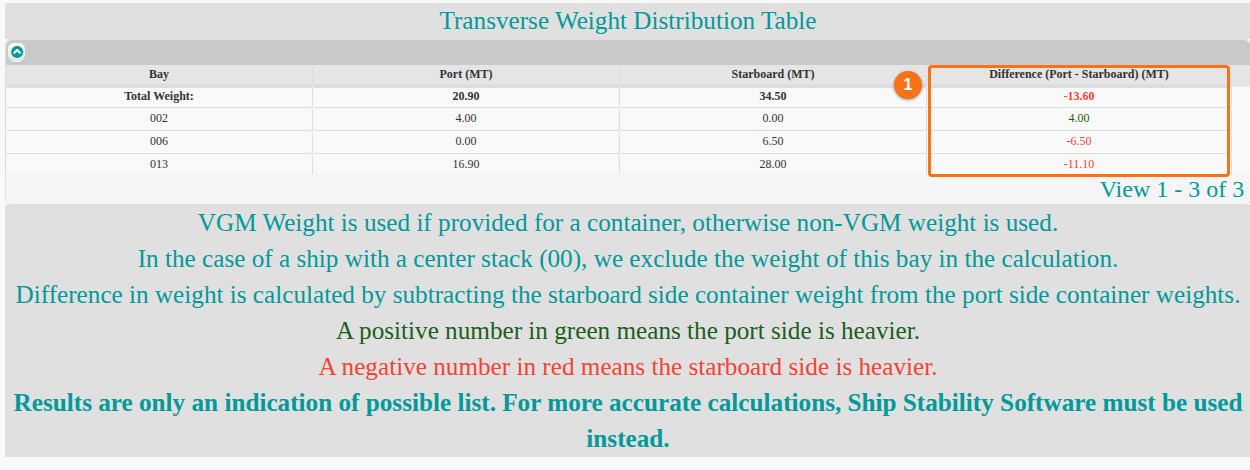
The table has one row for each bay and a Total Weight: row. The columns are:
| Column | What it shows |
|---|---|
| Bay | The bay number. |
| Port (MT) | The weight on the port (left) side of the bay, in metric tonnes. |
| Starboard (MT) | The weight on the starboard (right) side of the bay, in metric tonnes. |
| Difference (Port - Starboard) (MT) | The port weight minus the starboard weight (1 in the picture). |
How to read the difference
Section titled “How to read the difference”- A positive number is green. The port side is heavier.
- A negative number is red. The starboard side is heavier.
How the weights are calculated
Section titled “How the weights are calculated”- For each container, the report uses the VGM weight (verified gross mass) if it is given. If not, it uses the non-VGM weight.
- If the vessel has a center stack (00), the report does not count the weight of that bay.
Note: the difference only shows a possible list. For an accurate result, use ship stability software.