

How to fix missing segments
Esta página aún no está disponible en tu idioma.
Use this guide when a BAPLIE file fails to upload because a required segment (a line of data) is missing. BAPLIE Viewer Online can add the missing segments for you, so that the file can open.
Files are sometimes sent with bad or missing data. This can stop a TOS (terminal operating system) or another system from reading them.
- Upload your file with the default option Automatically Detect Contents. For details, see How to upload a BAPLIE file.
- If the file fails, the Validation Results page lists the reasons. The checks follow the SMDG specification.
- Check if one reason is a missing segment. If it is, click the Click here link (1 in the picture). The link text is “to try this file again by fixing segments”.
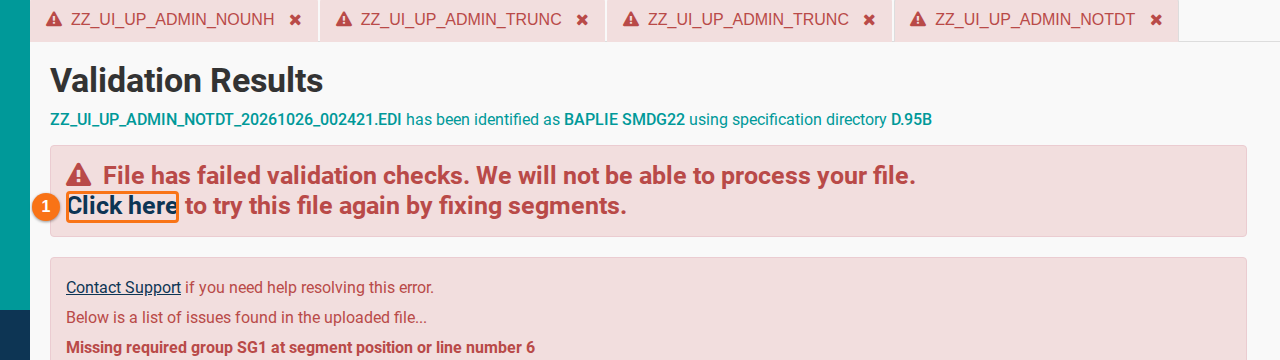
- Wait while the system adds the missing segments. It can add segments such as RFF (reference), EQD (equipment details) and MEA (measurements) with default data. Then the file can continue.
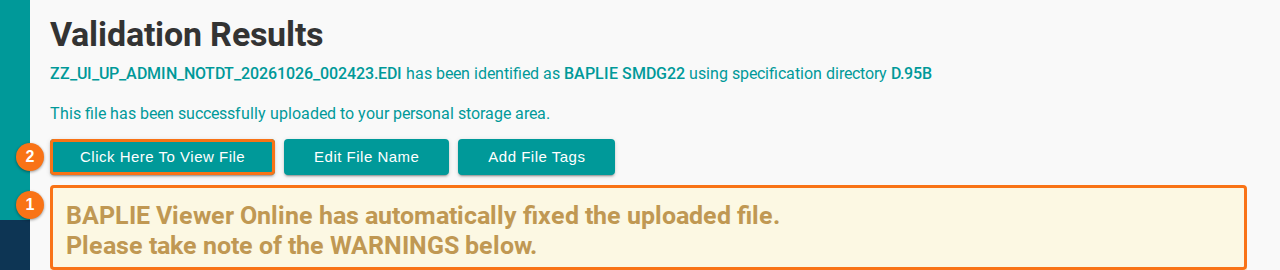
- Read the warning (1 in the picture). It says that BAPLIE Viewer Online fixed the uploaded file. Read the WARNINGS below it.
- Click Click Here To View File (2 in the picture) to open the file as usual.
After the fix
Section titled “After the fix”You can find the data that the system added in the Anomalies tab. Correct it there. Then you can download a new BAPLIE file with the correct format and use it in other systems.
For more about the Anomalies option, see more information.