

How to use BAPLIE Viewer Online in other languages
Esta página aún no está disponible en tu idioma.
Languages you can use
Section titled “Languages you can use”Use this guide to change the language of BAPLIE Viewer Online. The program has these languages:
- English
- Spanish
We hope to add more languages soon.
- Your browser may have a translation feature. You can use it, but some functions may not show correctly.
- Our live chat has a translation service if you need help.
- If you want to test a new language for us, contact Support.
Change the language
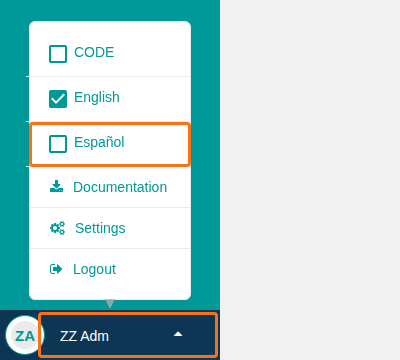
Section titled “Change the language”- On any page, click your user name at the bottom left of the screen (the orange box at the bottom of the picture). A menu opens.
- Click the language that you want, for example Español (the orange box in the middle). The menu also shows English and CODE.
The Function Menu and the settings tabs now show in Spanish.
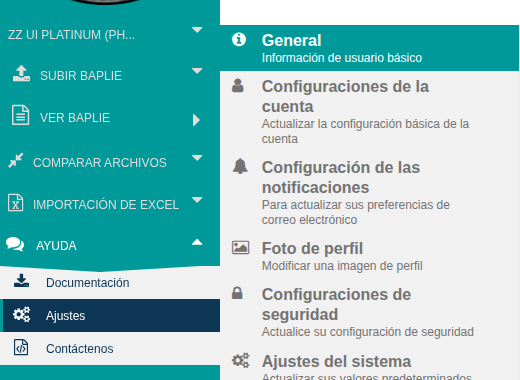
To go back to English, use the same steps and click English. BAPLIE Viewer Online remembers your language the next time that you log in.
Change the language of Excel exports
Section titled “Change the language of Excel exports”Only administrators can do this.
- Log in. In the Function Menu on the left, click Manage Facility.
- Click Facility Settings.
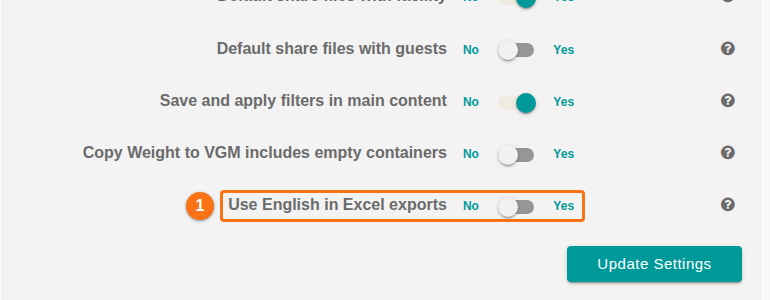
- Find Use English in Excel exports (1 in the picture). Choose Yes or No:
- Yes: the Excel file keeps English column headers.
- No: the Excel file uses the language that you use now.
- Click Update Settings at the bottom of the section.
Report a translation error
Section titled “Report a translation error”If you find a translation error, contact Support.