

How to contact Support and create a support ticket
Esta página aún no está disponible en tu idioma.
Use this guide when you need help from the BAPLIE Viewer Online support team. You send a message from inside the application. Our team turns your message into a support ticket and answers it.
Before you start: log in to BAPLIE Viewer Online. Collect the details that help us: the page where the problem happened, what you clicked, the time, and the name of your file.
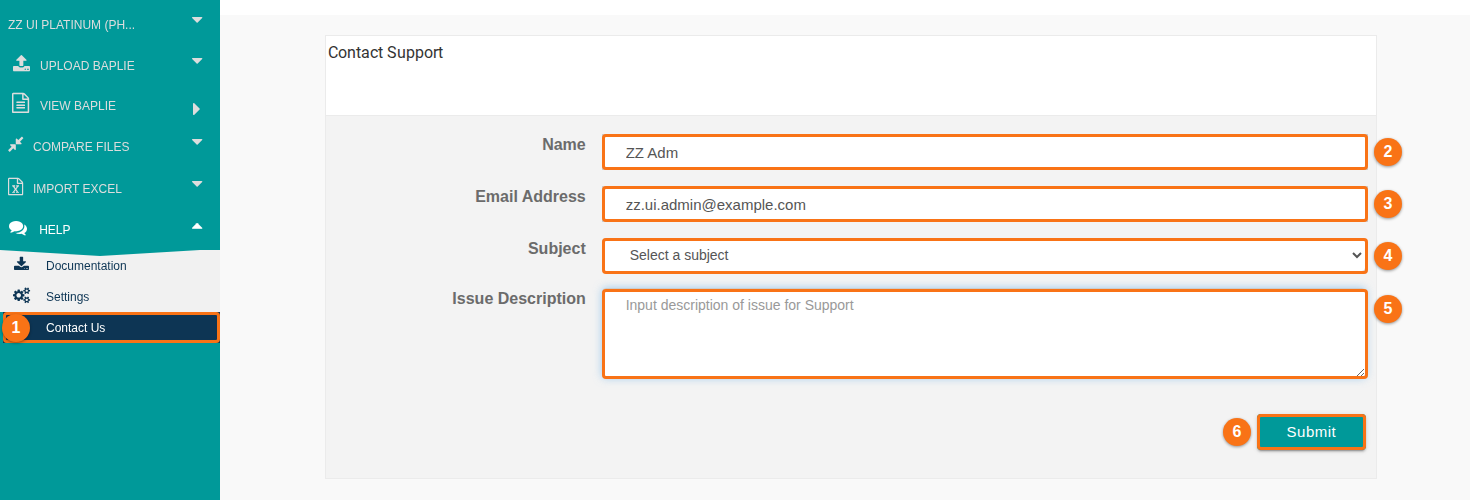
- In the Function Menu on the left, click Help. Then click Contact Us (1 in the picture). The Contact Support page opens.
- Check Name (2 in the picture). The application fills it with your name. Change it if you want.
- Check Email Address (3 in the picture). The application fills it with your email address. Use an address that you read every day. Enter a valid address.
- Click the Subject list (4 in the picture) and choose the reason for your message:
- Account Issues
- Technical Issues
- Membership Question (use this for questions about prices, upgrades and quotes)
- Feedback
- Other
- Write your message in Issue Description (5 in the picture). Write at least 30 characters. Include:
- what you wanted to do,
- the steps you did, one by one,
- what you expected and what happened,
- the page, the file name and the time,
- the exact text of any error message (see How to display and report errors).
- Click Submit (6 in the picture).
- A message tells you that your message was sent. Our team answers within 24 hours.
If the form shows an error
Section titled “If the form shows an error”- Please enter a name: fill in Name.
- Please enter a valid email address: check Email Address.
- Please select a subject: choose a reason in Subject.
- Please enter your issue - this should be at least 30 characters in length: write a longer description.
Good to know
Section titled “Good to know”- You cannot attach files or screenshots to the form. Describe the problem in words and copy the text of error messages into Issue Description.
- Never write your password in the message.
- When a file fails the checks during upload, click Contact Support on the validation result. It opens the same form.