

How to navigate the Header Details
Esta página aún no está disponible en tu idioma.
Use the Header Details screen to see and edit the header information of your BAPLIE file. BAPLIE Viewer Online checks the header against the SMDG specification for BAPLIE when the page opens. Errors in the header are highlighted for you.
- In the Function Menu on the left, open Validation and click Header Details. The header information opens in segments. A segment is one line of the header, for example Details of Transport. The check starts when the page opens.
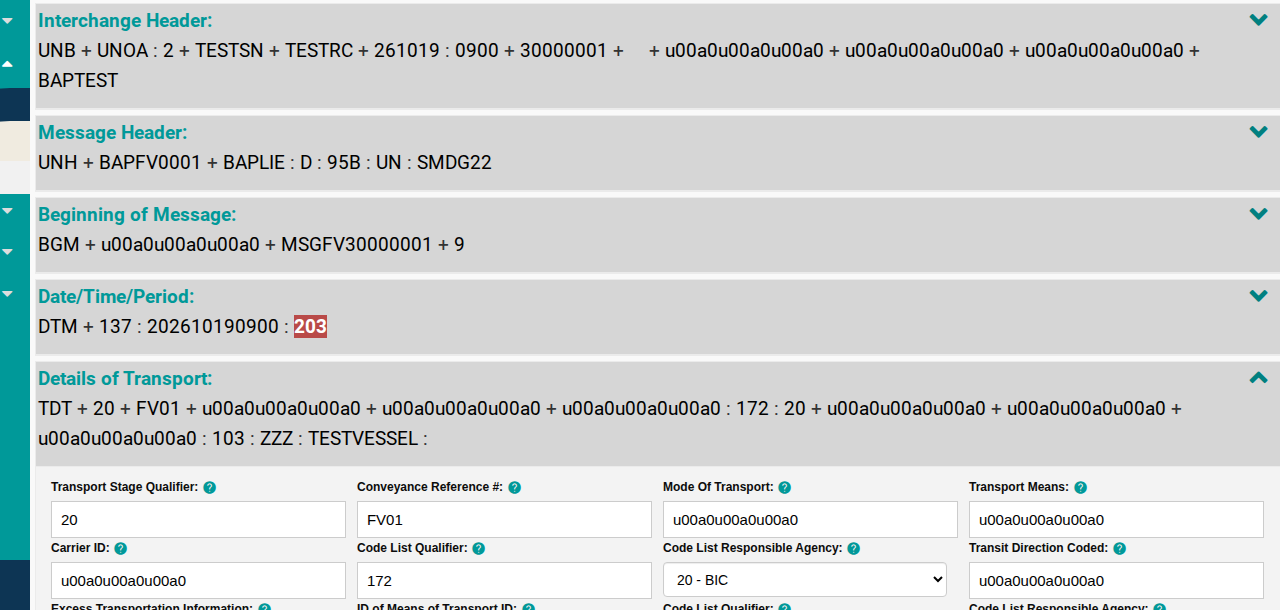
- If the check fails, a message appears at the top of the screen (1 in the picture). Fields with errors are shown in red.
- To see the fields of a segment, click the arrow on the right side of the segment (2 in the picture). Click it again to close the segment.
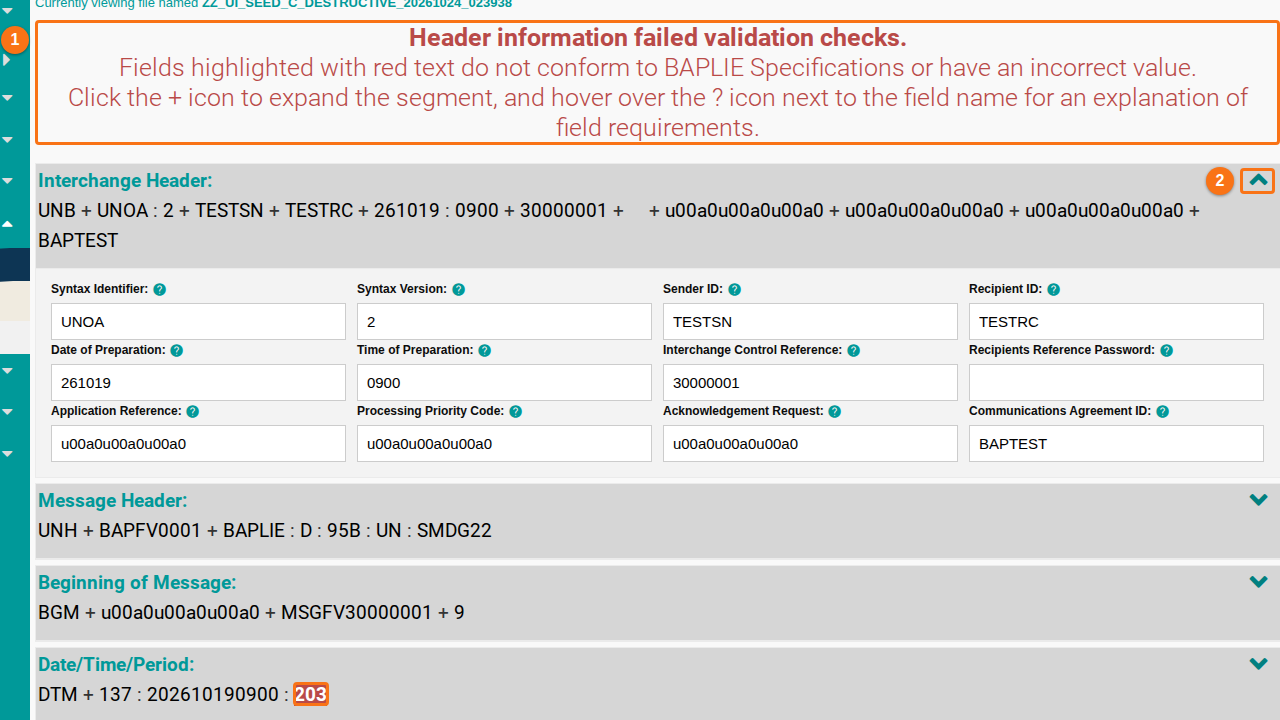
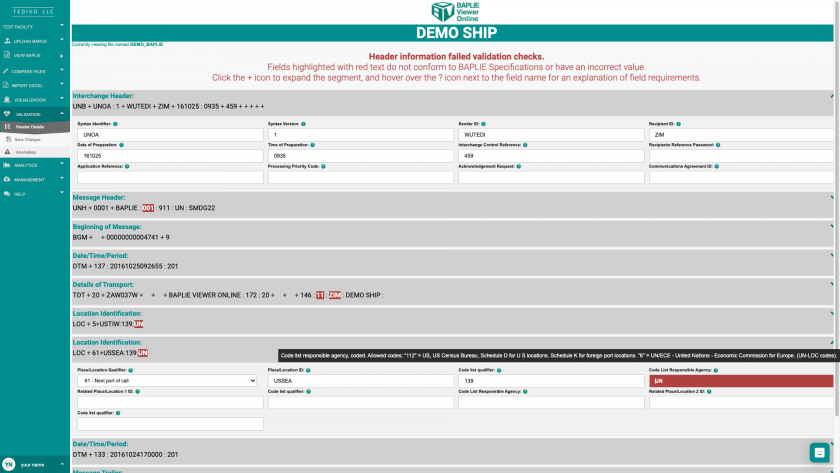
- Click into the red fields and correct the errors.
- Point to the ? icon next to a field name. A short text explains what the field needs.
Edit the header details
Section titled “Edit the header details”You can edit all fields on the Header Details screen.
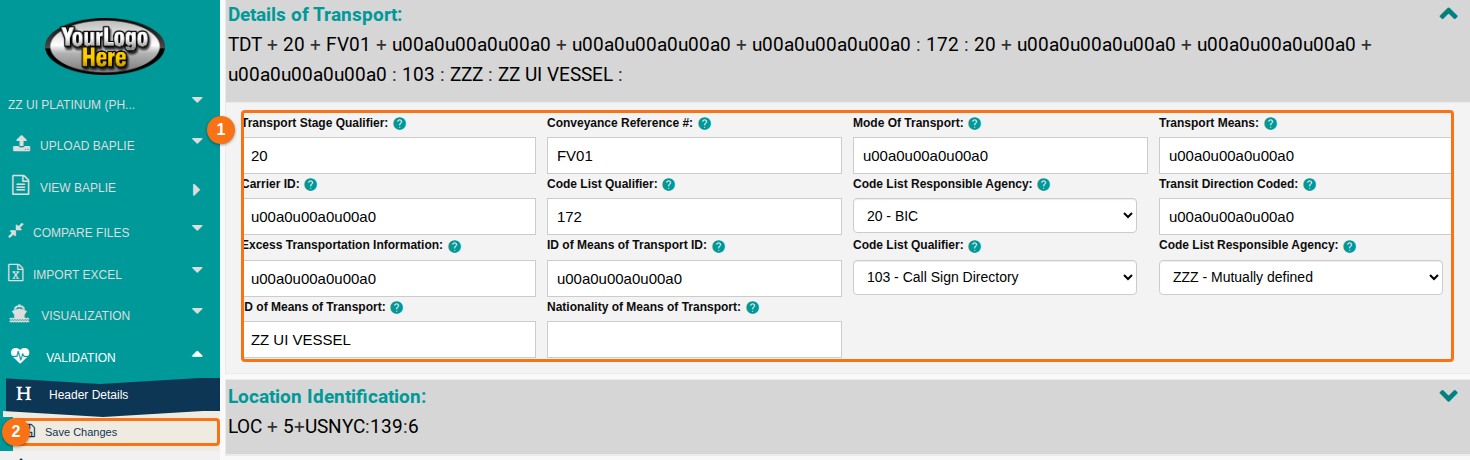
- Open a segment. Change the fields in its text boxes and drop-downs (1 in the picture).
- In the Function Menu, click Save Changes (2 in the picture). The page reloads. Fields that you fixed are no longer red.
Field value explanations
Section titled “Field value explanations”The SMDG specification defines these fields. The explanations are for the current BAPLIE 2.2 specification. Each segment starts with an example line from a file.
Interchange Header
Section titled “Interchange Header”Example: UNB + UNOA : 2 + RON + HAM + 200915 : 0858 + 0 + + + + +
- Syntax Identifier: this value is always UNOA
- Syntax Version: this value is always 2
- Sender ID: name code of the sender of the message
- Recipient ID: name code of the receiver of the message
- Date of Preparation: preparation date of the message
- Time of Preparation: preparation time of the message
- Interchange Control Reference: a reference by the sender that identifies the message. It must also be sent in the Interchange Trailer segment UNZ
- Recipients Reference Password: not used
- Application Reference: not used
- Processing Priority Code: not used
- Acknowledgement Request: not used
- Communications Agreement ID: code of the shipping line of the vessel (BIC or SCAC code). With this code the receiver can route the message correctly, even if the sender is not the shipping line (for example a container terminal in the previous port)
Message Header
Section titled “Message Header”Example: UNH + 1 + BAPLIE : D : 95B : UN : SMDG22
- Message Reference: a reference from the sender that identifies the message. It must also be sent in the Message Trailer segment UNT
- Message Type ID: the name of the UNSM or EDIFACT message, here BAPLIE
- Message Type Version #: the version number of the message, now “D”
- Message Type Release #: the release number of the message, now “95B”
- Controlling Agency: the code of the controlling agency, for this message use “UN”
- Association Assigned Code: the version number of the SMDG user manual, use “SMDG22”. With this the receiver can read the message correctly, even if older versions are in use
Beginning of Message
Section titled “Beginning of Message”Example: BGM + + 0 + 9
- Document Message Name: not used
- Document/Message #: a reference that the sender gives to the message, taken from the application
- Message Function: code for the function of the message. Use 2 for add to previous message, 3 to delete from previous message, 4 to change previous message, 5 to replace previous message, 9 for original message and 22 for final message
Date/Time/Period
Section titled “Date/Time/Period”Example: DTM + 137 : 202009150858 : 201
- Date/Time/Period Qualifier Code: use 137 for the date and time of the document or message
- Date/Time compiled: date or date and time when the message was made
- Format Qualifier Code: use 101 for YYMMDD, 210 for YYMMDDHHMM, 301 for YMMDDHHMMZZZ where ZZZ is the time zone, for example GMT
Details of Transport
Section titled “Details of Transport”Example: TDT + 20 + 002W + + + BVO : 172 : 20 + + + H4318 : 103 : 11 : BVO DEMO SHIP :
- Transport Stage Qualifier: use code 20 for main carriage
- Conveyance Reference #: use the discharge voyage number from the operating carrier or agent. The trade route can be part of the voyage number
- Mode Of Transport: not used
- Transport Means: not used
- Carrier ID: carrier name as a code: agreed code or standard carrier alpha code (SCAC)
- Code List Qualifier: use code 172 for the carrier code
- Code List Responsible Agency: use 20 for BIC (Bureaus International des Containeurs), 166 for US National Motor Freight Classification Association (SCAC) or ZZZ for mutually defined
- Transit Direction Coded: not used
- Excess Transportation Information: not used
- ID of Means of Transport ID: use the Lloyds vessel code (IMO number), the call sign or a vessel code that both sides agreed on
- Code List Qualifier: use 103 for call sign directory, 146 for means of transport identification Lloyds code or IMO number, or ZZZ for mutually defined or IMO number
- Code List Responsible Agency: use 11 for Lloyds register of shipping when a Lloyds code is used for the vessel or barge, or ZZZ for mutually defined
- ID of Means of Transport: vessel name, if required
- Nationality of Means of Transport: code from the UN Country Code ISO 3166
Location Identification
Section titled “Location Identification”Example: LOC + 5+DEHAM:139:6
- Place/Location Qualifier: use 5 for the place of departure or 61 for the next port of call
- Place/Location ID: location code of the real place of departure, normally the sender of the message. If possible, use UN/LOC codes of 5 characters
- Code list qualifier: use 139 for port
- Code List Responsible Agency: use 112 for US, US Census Bureau, Schedule D for US locations, Schedule K for foreign port locations, or 6 for UN/ECE (United Nations Economic Commission for Europe, UN/LOC codes)
- Related Place/Location 1 ID: the ISO country code
- Code list qualifier: use 162 for country
- Code List Responsible Agency: use 5 for ISO
- Related Place/Location 2 ID: the state or province code, postal abbreviations
- Code list qualifier: use 163 for country sub entity, state or province
Date/Time/Period (second segment)
Section titled “Date/Time/Period (second segment)”Example: DTM + 178 : 2009150858 : 201
- Date/Time/Period Qualifier Code: use “178” for the real date and time of arrival at the sender’s port, “132” for the estimated date or date and time of arrival at the next port of call, “133” for the estimated date or date and time of departure at the sender’s port, or “136” for the real date and time of departure at the sender’s port
- Date/Time: date or date and time, in local time, when the means of transport arrived or left, or is expected to leave the sender’s port or to arrive at the next port of call
- Format Qualifier Code: use “101” for YYMMDD, “201” for YYMMDDHHMM or “301” for YYMMDDHHMMZZZ where ZZZ is the time zone, for example GMT
Message Trailer
Section titled “Message Trailer”Example: UNT + 61558 + 1
- Number of Segments: number of segments in the message, including the UNH and UNT segments but not the UNA, UNB and UNZ segments
- Message Reference #: this reference must be the same as the reference in the UNH segment
Interchange Trailer
Section titled “Interchange Trailer”Example: UNZ + 1 + 0
- Interchange Control Count: the number of messages in the interchange
- Interchange Control Reference: this reference must be the same as the reference in the UNB segment