

How to manage security settings for your facility
Esta página aún no está disponible en tu idioma.
Use this guide to set the password rules and the Multi Factor Authentication (MFA) options for your facility. MFA is a second check when a person signs in. The settings apply to the users of your facility.
Before you start: you must be the main user or an administrator of the facility.
- Log in to baplieviewer.com. The home page opens with the Function Menu on the left.
- Click Manage Facility under your facility’s name.
- Click Security. The page Password settings opens. It says: “Update the rules that team members need to follow when setting their passwords.”
- Turn each rule on or off with the switch next to it. Yes means the rule is on. No means it is off.
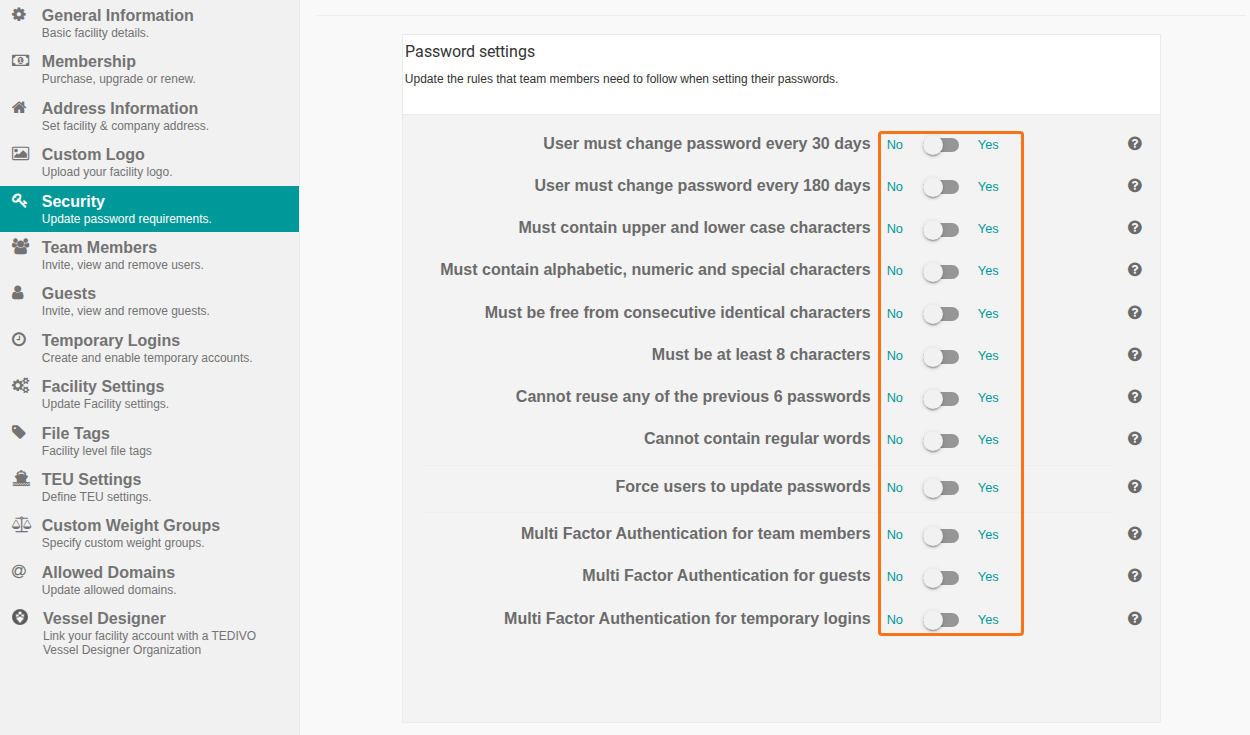
The settings save automatically. You do not need to click a button.
Password rules
Section titled “Password rules”| Setting | What it means |
|---|---|
| User must change password every 30 days | Users must change the password every 30 days. |
| User must change password every 180 days | Users must change the password every 180 days. |
| Must contain upper and lower case characters | The password needs capital letters and small letters. |
| Must contain alphabetic, numeric and special characters | The password needs letters, numbers and special characters. |
| Must be free from consecutive identical characters | The password cannot repeat the same character in a row. |
| Must be at least 8 characters | The password needs 8 or more characters. |
| Cannot reuse any of the previous 6 passwords | A user cannot choose one of the last 6 passwords again. |
| Cannot contain regular words | The password cannot contain ordinary words. |
| Force users to update passwords | Makes users update their passwords. |
Multi Factor Authentication
Section titled “Multi Factor Authentication”| Setting | What it means |
|---|---|
| Multi Factor Authentication for team members | Turns MFA on or off for team members. |
| Multi Factor Authentication for guests | Turns MFA on or off for guests. |
| Multi Factor Authentication for temporary logins | Turns MFA on or off for temporary logins. |
Good to know
Section titled “Good to know”- The settings apply to all new user accounts of your facility.
- If you change the rules after an account was created, the user must change the password only if User must change password every 30 days is on. The user sees the request when the current password expires.