

How to use the Advanced Search Query Builder
Esta página aún no está disponible en tu idioma.
Use this guide to find container records with the Advanced Search query builder. You build a query from one or more conditions. The table then shows only the matching records.
Before you start: upload a file and open it.
- In the Function Menu, open Visualization and click Main Content. The table with the file content opens.
- In the Function Menu, click Advanced Search. The Advanced Query Builder window opens.
- Build your query. You can use one condition or many. Each condition has three parts:
- An attribute, for example Weight (KG) or Equipment Nbr.
- An operator, for example greater or contains.
- A value, for example
7000orABCU.
- Click Apply Filter. The table shows only the records that match your query.
Any and all
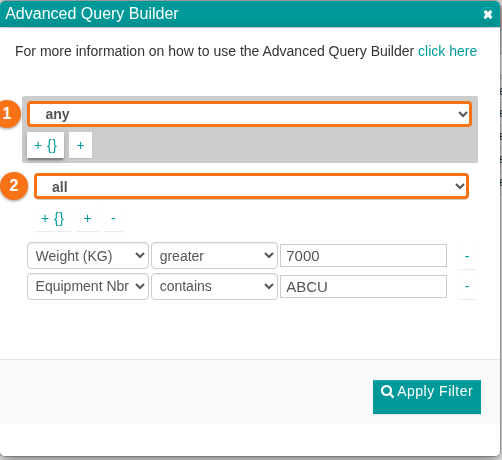
Section titled “Any and all”A group of conditions starts with any or all (1 and 2 in the picture).
- any means OR. A record is shown if it matches at least one condition in the group.
- all means AND. A record is shown only if it matches every condition in the group.
You can put one group inside another group. In the picture, the all group (2) is inside the any group (1). With groups, you can build a complex query for almost any search.
Attributes in the drop-down list
Section titled “Attributes in the drop-down list”The attributes you can choose depend on the columns that are visible in the table. To show or hide columns, see How to add and remove columns.